
Streamline Your Operational Workflow with Kazentic
Streamline Processes, Coordinate Effortlessly, and Drive Efficiency
- Keep daily operations running smoothly with ease.
- Optimize resources and coordinate effectively across departments.
- Centralize tasks, workflows, documents, and communication in one hub.
- Focus on delivering consistent results without unnecessary chaos.
PURCHASE REQUEST · WF-14
Step 3 of 4
Request raised
Operations · Mon 09:12
Budget checked
Finance · Mon 14:40
Manager approval
Farah R. · waiting 2 hours
Purchase order issued
Queued automatically
TEAM LOAD THIS WEEK
Balanced
Operations
82%
Finance
64%
Facilities
45%
Configure the Org Once
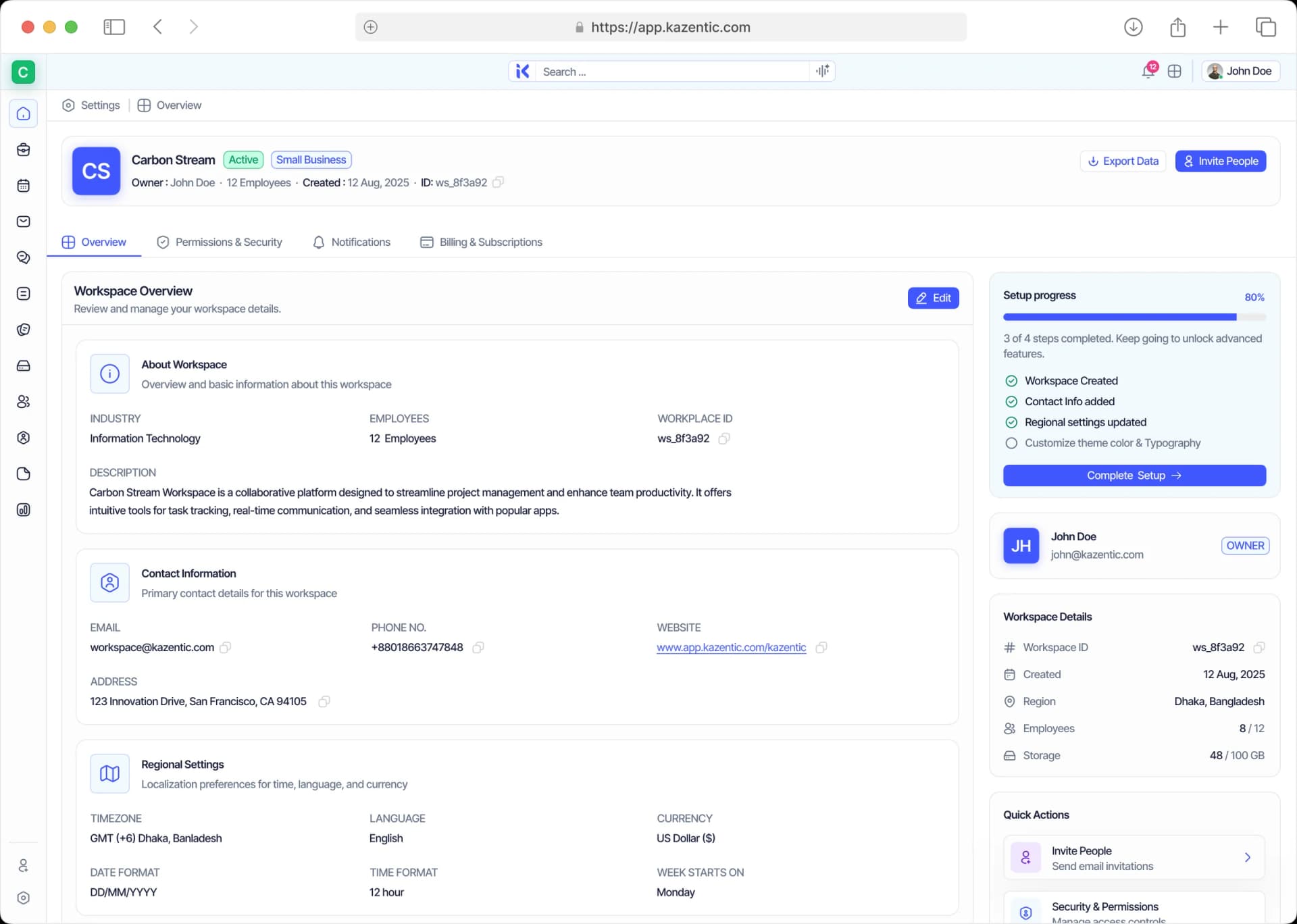
The settings everything else inherits. Industry, currency, timezone and language sit in one place, and project configuration standardises statuses, types and fields across every team.
General Info
Company profile, locale defaults and the contacts on record.
Project Configuration
Projects start from the same statuses, types and fields.
Notification Settings
Choose a module and tune exactly what it sends, and to whom.
Access Without a Queue
Rights follow the role, not the person. Every permission is grouped by the module it belongs to, a whole designation can be granted at once, and guests get a view-only scope.
Roles & Permissions
Set each module’s rights once, per role, not per person.
Grant by Designation
Give a permission set to everyone holding that title.
Guests
External collaborators with a view-only, scoped account.
One Notice, Right Audience
Announcements replace the all-staff email. Target everyone, specific teams or named people, publish now or on a schedule, and group the feed by Unread to see who has not opened it.
Audience Targeting
Pick the whole company, a few teams or a handful of names.
Types & Scheduling
System Update, Action Required, FYI, Critical, Reminder.
Read State
Sort the feed by Unread and chase only the people who need it.
Know What It Costs
Evidence instead of recollection. Activity logs filter by module and actor, workspace statistics cover people, projects, sales and communication, and storage shows usage against quota.
Activity Logs
Filter by Task Manager, Inbox, Storage, Billing and more.
Workspace Statistics
People, projects, sales, communication and storage.
Storage Analytics
Usage against quota, by file type, before it surprises you.
Everything Operations Touches, in One Workspace
Six modules doing the work of six tools — configuration, access, comms and the paper trail.
Access Control
Permissions per module, granted by role or by designation.
Configuration
Locale, currency and working defaults, set once for everyone.
Announcements
Targeted, scheduled notices with read state per person.
Storage
Folders, tags, owners, shared users and usage against quota.
Activity Logs
Who changed what, filtered by module, actor and date.
Support
Tickets with category, priority, owner and resolution stats.
A Normal Week in Operations, Two Ways
On the left, permissions, notices and the audit trail live in different tools. On the right, they do not.
THE USUAL WEEK
Without Kazentic
- Access requests handled one person at a time
- Notices posted three times in three places
- Nobody can say who changed what, or when
- Files spread across personal drives
- Internal requests arrive as direct messages
THE SAME WEEK
With Kazentic
- One role change updates everyone who holds it
- One announcement, targeted, scheduled, tracked
- Every change carries who made it, where and when
- Shared storage with owners, tags and a quota
- Internal requests become tickets someone owns
One console for the whole operation
Set It Once, Inherit Everywhere
Industry, currency, timezone and language for the whole workspace.
Optimize Your Operational Coordination With Kazentic
Operational teams run on clarity and consistency. Kazentic gives tasks, data and communication a single source of truth to work from.
Cross-Department Coordination
One update reaches finance, HR and delivery at the same moment.
Standardized Workflows
Every team works from the same statuses and fields, so handoffs need no translation.
Centralized Oversight
Budgets, schedules and access in one console instead of four tools.
Discover what operations teams think about Kazentic

Nabila Jahan
Head of OperationsAccess requests stopped landing in my DMs on day one.

Oliver Grant
Office ManagerOne announcement replaced three emails and a notice board.

Ishaan Verma
IT & Access AdministratorRoles map to designations, so onboarding takes minutes.

Camille Dubois
Operations CoordinatorThe activity log settles who changed what in seconds.

Kwame Boateng
Facilities LeadStorage quota alerts arrive before anyone hits the wall.
Nabila Jahan
Head of OperationsAccess requests stopped landing in my DMs on day one.
Oliver Grant
Office ManagerOne announcement replaced three emails and a notice board.
Ishaan Verma
IT & Access AdministratorRoles map to designations, so onboarding takes minutes.
Camille Dubois
Operations CoordinatorThe activity log settles who changed what in seconds.
Kwame Boateng
Facilities LeadStorage quota alerts arrive before anyone hits the wall.