
Run Every Project From One Board, Not Six Tools
Plan the work, watch the hours, and see the whole portfolio - projects, tasks, sprints and capacity live in one workspace.
- Eleven views on every project - List, Board, Gantt, Timeline, Table, Calendar, Workload and more.
- Capacity planning by day, week or month before you commit to a deadline.
- Every hour logged against a task, reviewed and approved in the same place.
- Burndown, time and sprint reports without exporting anything.
Discovery
Design
Build
Launch
Same project, eleven views
30% done
PORTFOLIO
5 projects
Brand refresh
Due 20 Aug
Mobile app v2
Due 04 Sep
Data migration
At risk
One Project, Eleven Views
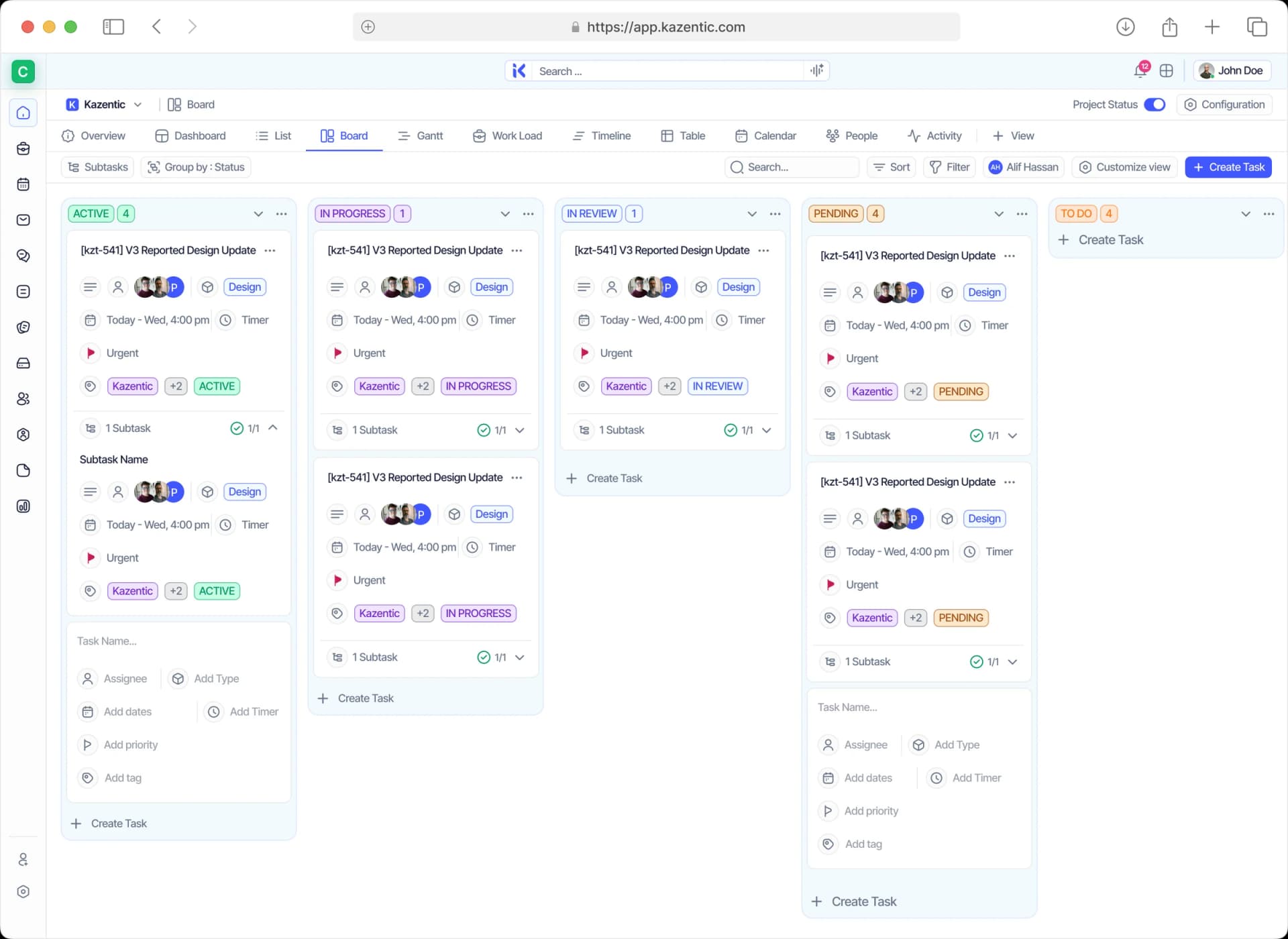
Nobody has to adopt someone else’s layout. The same tasks appear as a list, a board, a Gantt, a timeline, a table or a calendar — with Work Load, People and Activity views sitting beside them.
Board & List
Drag work across Backlog, To Do, In Progress, Code Review and Done.
Gantt & Timeline
Dependencies, overlaps and slippage in one horizontal read.
Table & Custom Fields
Add Money, Rating, Date, Progress Bar and nine more field types, per project.
Hours, Already Reconciled
The timer lives on the task, so the timesheet is a by-product of doing the work. People submit a week, reviewers approve or return it, and the hours that get billed sit in their own Payable view.
One-Click Logging
Start the timer on the task and stop it when the work is done.
Review Requests
Entries carry Not Submitted, Pending or Approved.
Payable Hours
Keep the hours you bill apart from the ones you don’t, without a second tool.
Capacity Before You Promise
Work Load shows who is loaded and who is free, in the unit your team actually plans in — days, weeks or monthly availability — with each person’s points sitting against their weekly capacity.
Days, Weeks or Monthly
Switch the grid to match how your team actually plans.
Points vs Capacity
See 1/3 pt against a weekly capacity, per person, per sprint.
The Unassigned Bucket
See the work nobody owns yet, before the sprint starts.
Sprints With Real Numbers
Templates, categories and point-based effort make every cycle comparable to the last. Progress reads 1/6 rather than “nearly done”, and burndown reads from the same points your team estimated.
Sprint Templates
Start each cycle with your ceremonies already configured.
Effort in Points
Progress reads 1/6 — a number, not an opinion.
Burndown & Reports
Scope, velocity and carry-over without a spreadsheet.
Everything a Project Lead Touches, in One Workspace
Six modules doing the work of six tools — with the same people, projects and hours behind every one of them.
Projects
Every client or product line as its own project, with status, type and owner.
Tasks
Eleven views on the same work — List, Board, Gantt, Timeline, Table and Calendar.
Sprints
Point-based cycles from reusable templates, with burndown and sprint reports.
Work Load
Capacity per person by day, week or month, before you commit to a date.
Time Tracker
A timer that runs on the task, weekly timesheets and a review queue.
Reports
Task, time, burndown and sprint reports that stay current without an export.
The Week Before a Deadline, Two Ways
On the left, the plan, the hours and the people live in different tools. On the right, they do not.
THE USUAL WEEK
Without Kazentic
- Status chased in DMs the day before the review
- Capacity guessed from memory, then apologised for
- Hours logged in one tool, tasks tracked in another
- Dependencies remembered, or found out the hard way
- Reports rebuilt by hand every Friday afternoon
THE SAME WEEK
With Kazentic
- Board, Gantt and Activity update as work moves
- Work Load shows each person’s points vs capacity
- The timer runs on the task and lands in the timesheet
- Dependencies set on the task, drawn on the Gantt
- Burndown and time reports that are always current
All the tools your team needs to succeed
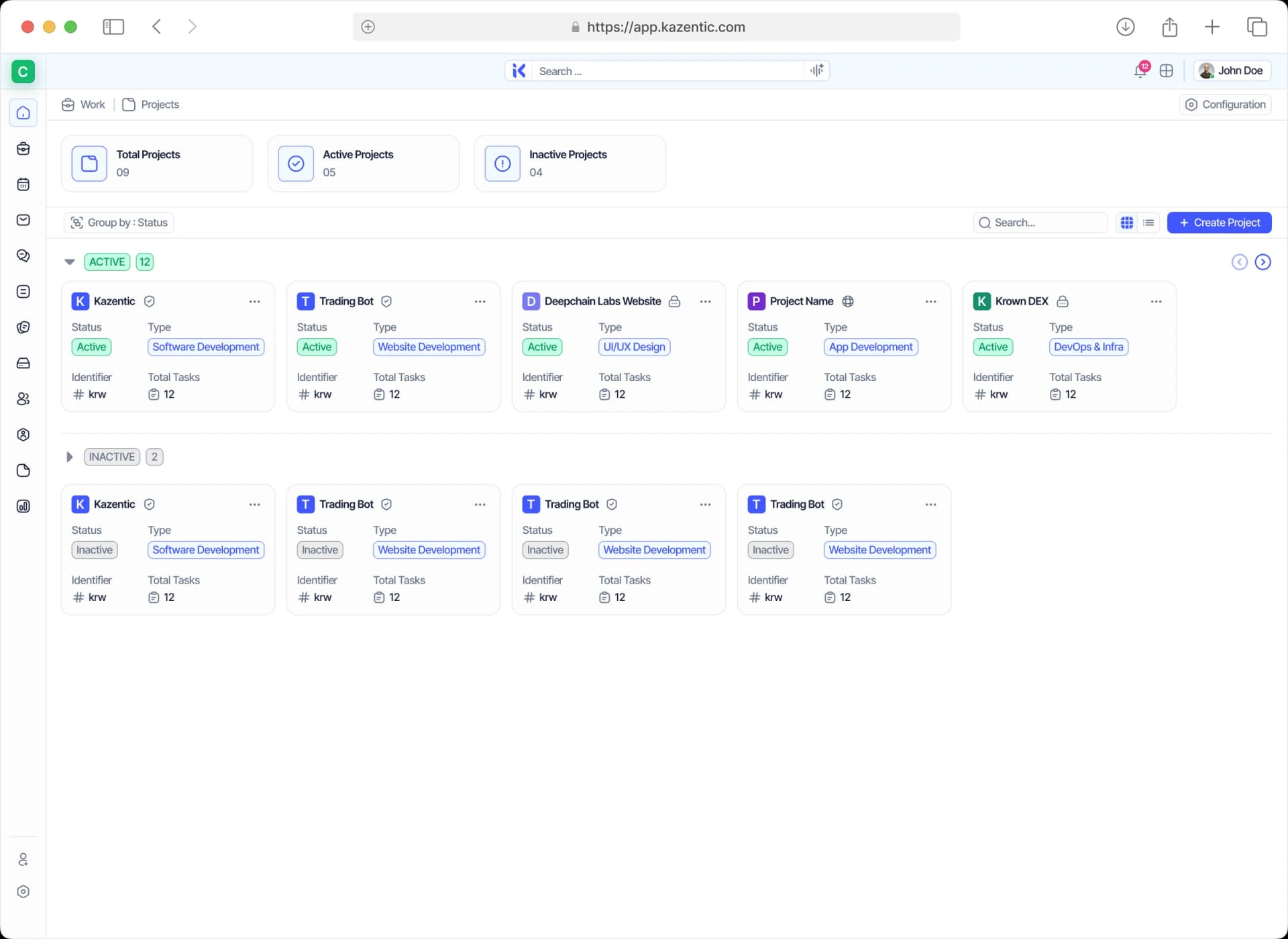
Every Project, One Place
Status, type, owner and task count across the whole portfolio.
Empower Your Project Management Team With Kazentic
Flexibility and simplicity, end to end. Kazentic keeps the work, the hours and the people in one place, so your team spends the week delivering instead of reporting on it.
Instant Reporting
Live progress for stakeholders at any time, without anyone building a status deck.
Resource Balancing
Adjust workloads across projects so nobody is over-committed and the dates stay realistic.
Unified Task Oversight
Every assignment, milestone and deadline in one place — no spreadsheets, no email threads.
Discover what project teams think about Kazentic

Rina Mahmud
Delivery ManagerGantt, board and timesheets finally agree on one date.

Samir Ahsan
Head of PMOWork Load ended the overbooking before every sprint.

Laura Kim
Agency Project LeadClients see live progress. No Friday status deck anymore.

Diego Navarro
Scrum MasterBurndown reads from real points, so retros stay honest.

Maya Hossain
Operations DirectorBillable hours come straight off the task timers now.
Rina Mahmud
Delivery ManagerGantt, board and timesheets finally agree on one date.
Samir Ahsan
Head of PMOWork Load ended the overbooking before every sprint.
Laura Kim
Agency Project LeadClients see live progress. No Friday status deck anymore.
Diego Navarro
Scrum MasterBurndown reads from real points, so retros stay honest.
Maya Hossain
Operations DirectorBillable hours come straight off the task timers now.