
Kazentic Simplified Work for Remote Professionals
Chat, calendar, files, docs and the timer behind one login, so a team spread across time zones works from the same place.
- Presence and local time for every teammate, so you know who is online before you ask.
- One shared calendar with the join link on the booking itself.
- Files, docs and notes that live in the workspace, never only on a laptop.
- A timer on the task and a submitted week, visible to every time zone.
YOUR TEAM RIGHT NOW
3 online
Farah Rahman
Dhaka · 4:30 PM
Marco Silva
Berlin · 11:30 AM
Yuki Tanaka
Tokyo · 7:30 PM
Ana Lopes
Lisbon · 10:30 AM
Marco handed off to Yuki
Planner spec · 3 comments
Picked up 9 hours later
No meeting
Conversation That Keeps Up
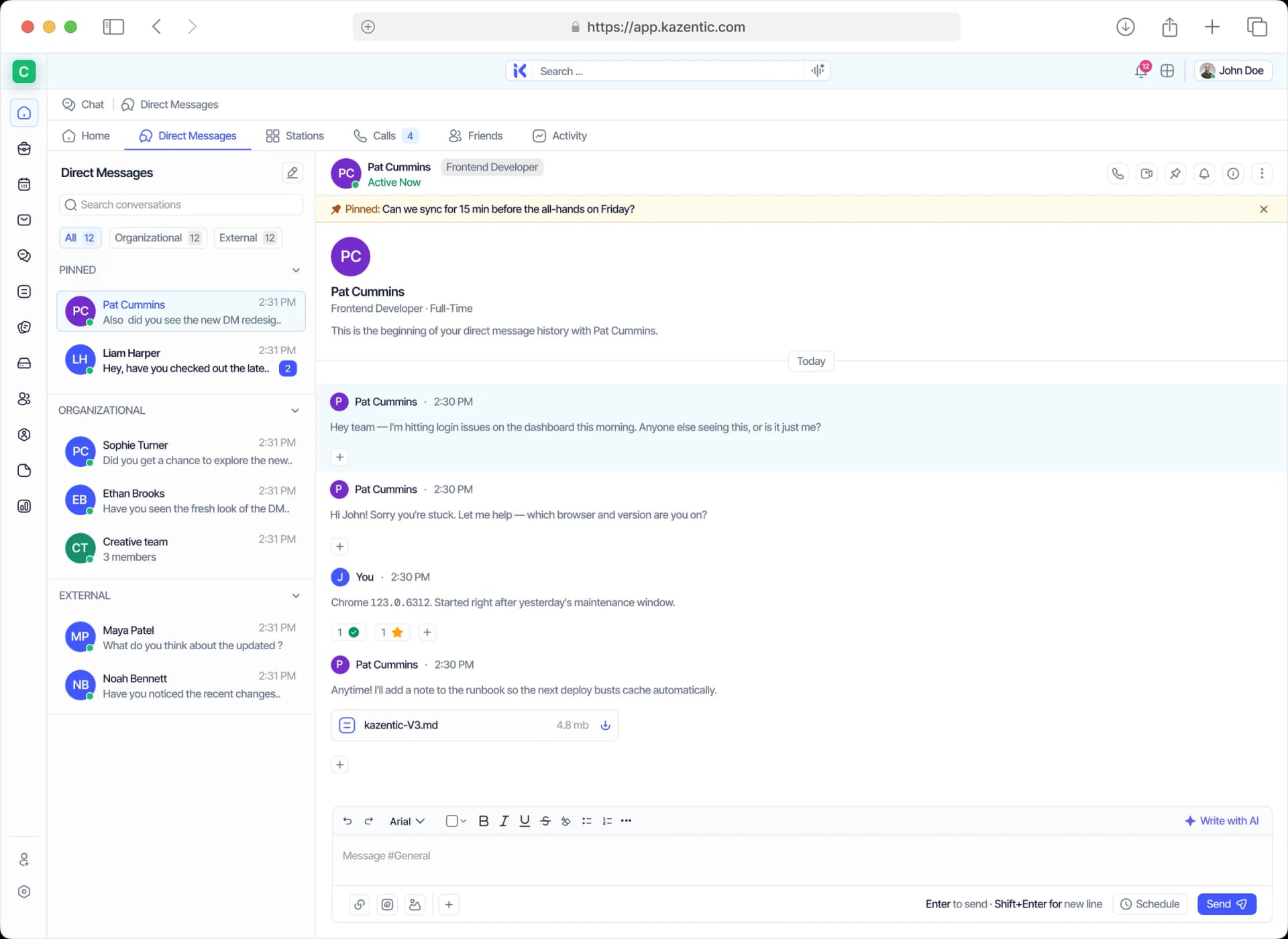
Chat is a module, not a bolt-on. DMs, channels and categories organise by team, project or topic; calls start from the thread; and stations keep internal work apart from outside guests.
DMs & Channels
Organised by team, project or topic, with categories.
Calls & Activity
Move from a thread to a call without changing apps.
Stations
Separate spaces for internal work and outside collaborators.
One Calendar, Every Zone
Everyone sees the same week. Events, meetings and holidays share one grid, the join link sits on the booking itself, and the workspace timezone is set once in organisation settings.
Shared Calendar
Events, meetings and holidays in a single grid.
Join Links
The meeting lives where the booking already is.
Workspace Timezone
Set once in settings, and respected everywhere after that.
Your Files, Wherever You Are
No local-only work. Storage carries folders, tags, owners, shared users and a visible quota; docs hold linked tasks and live charts; notes stay pinned, archived, Private or Protected.
Cloud Storage
Folders, tags, owners, shared users and a visible quota.
Docs
Write the spec, link the task and drop a live chart beside it.
Notes
Pinned, Archive and Trash, with Private or Protected scope.
Visible, Not Watched
Accountability you control. Start and stop the timer, submit the week and let it move through Not Submitted, Pending and Approved, while your board status speaks for you across time zones.
Time Logs
Start, stop and submit from wherever you are working.
Status on the Board
Your progress is visible to every time zone at once.
Forms
Collect team input asynchronously with a real field library.
Everything a Remote Team Touches, in One Workspace
Six modules doing the work of six tools — one login, wherever the working day starts.
Chat
DMs, channels, stations and calls without a second app.
Calendar
One shared week, with the join link on the booking itself.
Files
One shared drive for the whole team, with no local-only copies.
Docs
A block editor with linked tasks and live charts inside.
Notes
Pinned, archived, Private or Protected — and searchable later.
Time Tracker
Hours logged against the task and submitted as a week, wherever you are.
A Week Across Time Zones, Two Ways
On the left, the day needs five apps and three calendars. On the right, it needs one login.
THE USUAL WEEK
Without Kazentic
- Five apps open to do one day of work
- “Did you see my message?”
- Meetings booked across three calendars
- Files emailed back and forth
- Hours reconstructed at the end of the week
THE SAME WEEK
With Kazentic
- Chat, tasks, docs, files and the timer in one place
- Channels, DMs and announcements with read state
- One shared calendar with the join link on the event
- Shared storage with folders, tags and owners
- The timer runs on the task; the week is submitted
One login, wherever you work
Conversation With a Home
Pick up the thread, start the call, keep guests in their own station.
Empower Remote Professionals With Kazentic
Tools that adapt to a flexible working life: chats, tasks, schedules and files in one platform that travels with you wherever you work.
Accountability & Transparency
Log hours and show progress without anyone having to ask for an update.
Unified Workspace
Tasks, files and schedules in one platform instead of five logins.
Collaboration Without Borders
Chat, calls and shared docs keep everyone aligned across time zones.
Discover what remote teams think about Kazentic

Tahmid Rahman
Remote Engineering LeadDhaka to Berlin, one calendar, no more time zone maths.

Ingrid Solberg
Head of Remote OperationsHandoffs happen in the thread, not in a 7 AM meeting.

Joaquín Ferreira
Distributed Team LeadFiles finally live in the workspace, not on laptops.

Aarav Krishnan
Senior Product DesignerPresence shows who is online before I ping anyone.

Siobhan Gallagher
People Operations ManagerTimesheets submit themselves; nobody chases updates.
Tahmid Rahman
Remote Engineering LeadDhaka to Berlin, one calendar, no more time zone maths.
Ingrid Solberg
Head of Remote OperationsHandoffs happen in the thread, not in a 7 AM meeting.
Joaquín Ferreira
Distributed Team LeadFiles finally live in the workspace, not on laptops.
Aarav Krishnan
Senior Product DesignerPresence shows who is online before I ping anyone.
Siobhan Gallagher
People Operations ManagerTimesheets submit themselves; nobody chases updates.